Qt5 Tutorial QBrush and QRect - 2020

In this tutorial, we will learn QBrush and QRect.
The QBrush class defines the fill pattern of shapes drawn by QPainter. A brush has a style, a color, a gradient and a texture.
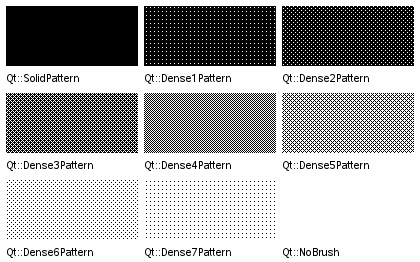
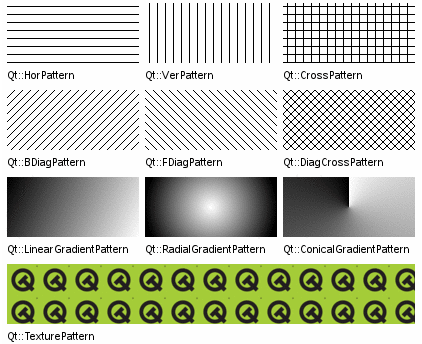
A QRect can be constructed with a set of left, top, width and height integers:
QRect::QRect(int x, int y, int width, int height)or from a QPoint and a QSize:
QRect::QRect(const QPoint & topLeft, const QSize & size)The following code creates two identical rectangles.
QRect r1(100, 200, 11, 16);
QRect r2(QPoint(100, 200), QSize(11, 16));
Qt->Qt Gui Application:
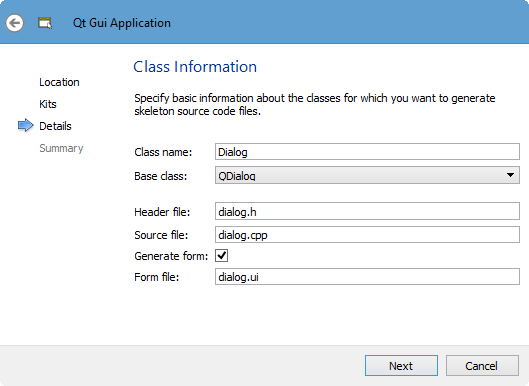
We will override QWidget::paintEvent() so that we can create customized widgets and have complete control over their appearance.
Here is the modified dialog.h:
// dialog.h

#ifndef DIALOG_H
#define DIALOG_H

#include <QDialog>
#include <QPainter>
#include <QRect>
#include <QBrush>

namespace Ui {
class Dialog;
}

class Dialog : public QDialog
{
    Q_OBJECT

public:
    explicit Dialog(QWidget *parent = 0);
    ~Dialog();

private:
    Ui::Dialog *ui;

protected:
    void paintEvent(QPaintEvent *e);
};

#endif // DIALOG_H
Here, we're going to reimplement paintEvent().
Here is the implementation file, dialog.cpp:
#include "dialog.h"
#include "ui_dialog.h"

Dialog::Dialog(QWidget *parent) :
    QDialog(parent),
    ui(new Ui::Dialog)
{
    ui->setupUi(this);
}

Dialog::~Dialog()
{
    delete ui;
}

void Dialog:: paintEvent(QPaintEvent *e)
{
    QPainter painter(this);

    int left = 100;
    int top = 50;
    int width = 200;
    int height = 150;

    // r1 and r2 are same
    QRect r1(left, top, width, height);
    QRect r2(QPoint(left, top), QSize(width, height));

    painter.setPen(Qt::blue);
    painter.drawRect(r1);
    // r1 as a bounding box
    painter.drawEllipse(r1);
}
In the paintEvent(), we created QPainter object. Then, we constructed a rectangle in two ways, and draw the rectangle and an ellipse with the rectangle as a bounding box.
If we run the code, we get:
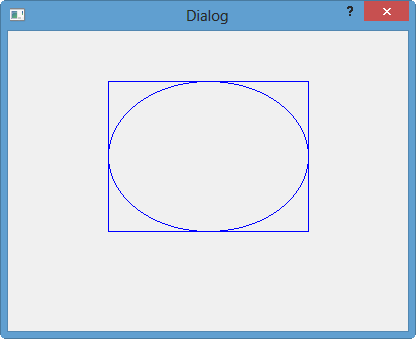
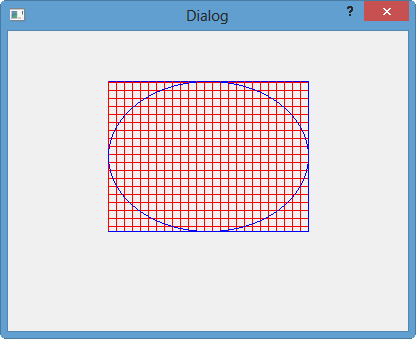
We can use a QBrush.
Brushes do fill and Pens do outline.
Here we reimplemented the paintEvent() again:
void Dialog:: paintEvent(QPaintEvent *e)
{
    QPainter painter(this);

    int left = 100;
    int top = 50;
    int width = 200;
    int height = 150;

    // r1 and r2 are same
    QRect r1(left, top, width, height);
    QRect r2(QPoint(left, top), QSize(width, height));

    painter.setPen(Qt::blue);

    QBrush brush(Qt::red, Qt::CrossPattern);

    painter.drawRect(r1);
    painter.fillRect(r1, brush);

    // r1 as a bounding box
    painter.drawEllipse(r1);


}
Run the code, then we will have:
Qt 5 Tutorial
- Hello World
- Signals and Slots
- Q_OBJECT Macro
- MainWindow and Action
- MainWindow and ImageViewer using Designer A
- MainWindow and ImageViewer using Designer B
- Layouts
- Layouts without Designer
- Grid Layouts
- Splitter
- QDir
- QFile (Basic)
- Resource Files (.qrc)
- QComboBox
- QListWidget
- QTreeWidget
- QAction and Icon Resources
- QStatusBar
- QMessageBox
- QTimer
- QList
- QListIterator
- QMutableListIterator
- QLinkedList
- QMap
- QHash
- QStringList
- QTextStream
- QMimeType and QMimeDatabase
- QFile (Serialization I)
- QFile (Serialization II - Class)
- Tool Tips in HTML Style and with Resource Images
- QPainter
- QBrush and QRect
- QPainterPath and QPolygon
- QPen and Cap Style
- QBrush and QGradient
- QPainter and Transformations
- QGraphicsView and QGraphicsScene
- Customizing Items by inheriting QGraphicsItem
- QGraphicsView Animation
- FFmpeg Converter using QProcess
- QProgress Dialog - Modal and Modeless
- QVariant and QMetaType
- QtXML - Writing to a file
- QtXML - QtXML DOM Reading
- QThreads - Introduction
- QThreads - Creating Threads
- Creating QThreads using QtConcurrent
- QThreads - Priority
- QThreads - QMutex
- QThreads - GuiThread
- QtConcurrent QProgressDialog with QFutureWatcher
- QSemaphores - Producer and Consumer
- QThreads - wait()
- MVC - ModelView with QListView and QStringListModel
- MVC - ModelView with QTreeView and QDirModel
- MVC - ModelView with QTreeView and QFileSystemModel
- MVC - ModelView with QTableView and QItemDelegate
- QHttp - Downloading Files
- QNetworkAccessManager and QNetworkRequest - Downloading Files
- Qt's Network Download Example - Reconstructed
- QNetworkAccessManager - Downloading Files with UI and QProgressDialog
- QUdpSocket
- QTcpSocket
- QTcpSocket with Signals and Slots
- QTcpServer - Client and Server
- QTcpServer - Loopback Dialog
- QTcpServer - Client and Server using MultiThreading
- QTcpServer - Client and Server using QThreadPool
- Asynchronous QTcpServer - Client and Server using QThreadPool
- Qt Quick2 QML Animation - A
- Qt Quick2 QML Animation - B
- Short note on Ubuntu Install
- OpenGL with QT5
- Qt5 Webkit : Web Browser with QtCreator using QWebView Part A
- Qt5 Webkit : Web Browser with QtCreator using QWebView Part B
- Video Player with HTML5 QWebView and FFmpeg Converter
- Qt5 Add-in and Visual Studio 2012
- Qt5.3 Installation on Ubuntu 14.04
- Qt5.5 Installation on Ubuntu 14.04
- Short note on deploying to Windows
Ph.D. / Golden Gate Ave, San Francisco / Seoul National Univ / Carnegie Mellon / UC Berkeley / DevOps / Deep Learning / Visualization
 My YouTube channel